Your site can be fast, stable, and professionally hosted on Google Compute Engine, and still be nearly invisible to AI answer engines. That is the part many teams miss. They verify uptime, pass Core Web Vitals, ship content, and assume crawlers will take care of the rest.
Then the support tickets start. Brand answers in AI tools cite competitors. Product pages do not appear in summaries. Documentation pages are reachable in a browser but weakly represented in generated answers. Nobody knows whether GPTBot, ClaudeBot, PerplexityBot, Google-Extended, or other AI crawlers ever saw the page correctly.
Teams think the problem is Google Compute Engine. The real problem is the visibility architecture around it: routing, bot policy, rendering, structured data, logs, canonical content, and the feedback loop between developers and content owners.
That changes the conversation. Google Compute Engine is not an AEO strategy. It is part of the delivery path that either helps AI systems retrieve, understand, and trust your content, or quietly breaks that chain.
Table of contents
Why Google Compute Engine is an AEO architecture issue
The crawler does not care where your VM lives
AI crawlers do not reward you for running on Google Compute Engine. They care about whether they can request a URL, receive a useful response, extract the content, interpret the entity relationships, and decide that the page is safe and useful enough to reference.
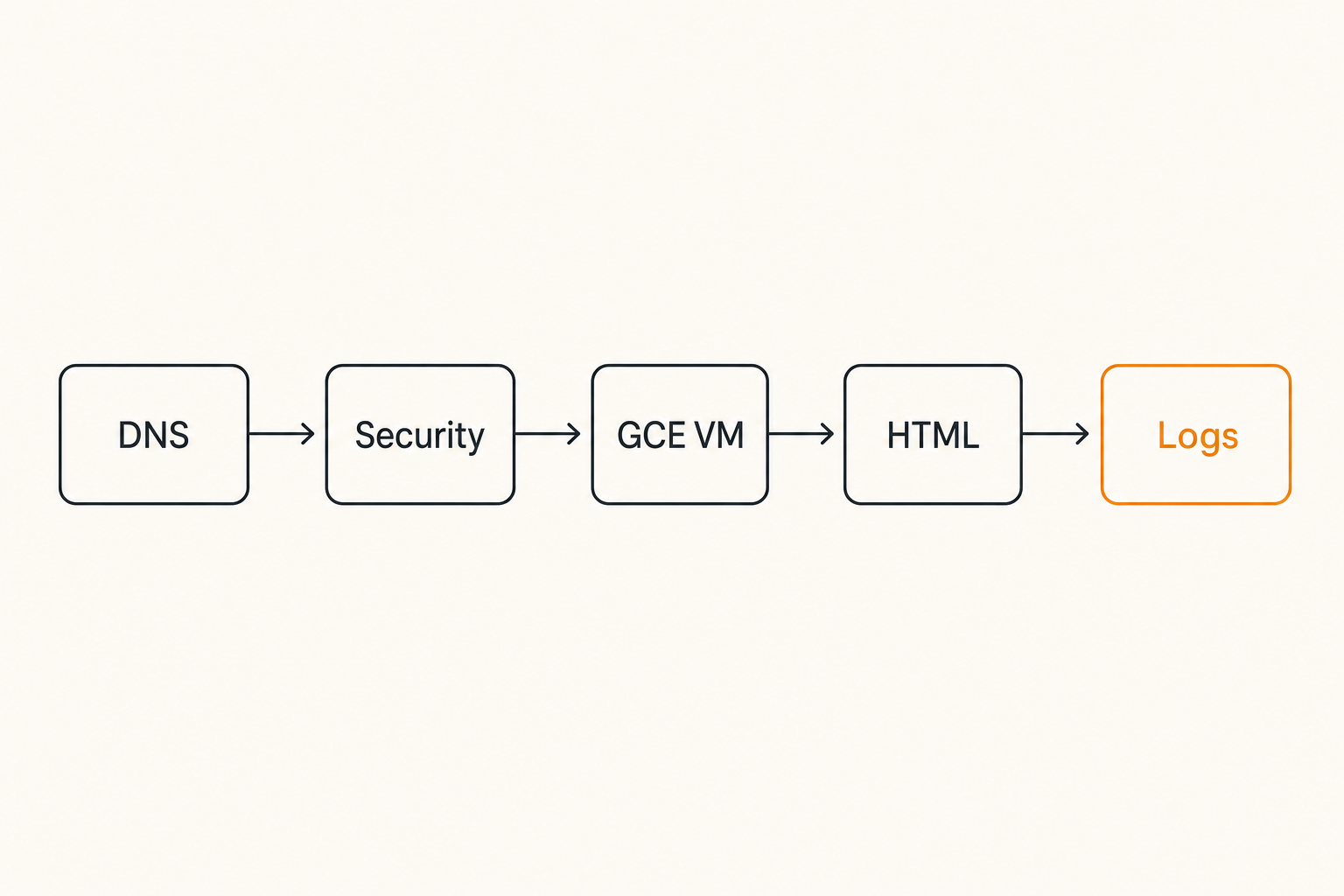
That sounds obvious until you look at a real production stack. A page may pass through DNS, a load balancer, Cloud Armor, a reverse proxy, a VM group, an application framework, a CDN, a JavaScript rendering layer, and several middleware rules before any content is returned. Every layer can change the answer to one question: can an AI crawler reliably understand this page?
The practical question is not whether Google Compute Engine is good or bad for AEO. It is whether your GCE-hosted application exposes the right content contract to answer engines.
Practical rule: Treat hosting as the delivery layer, not the visibility layer. A fast VM does not fix blocked bots, thin HTML, missing schema, or confusing canonical signals.
Teams think hosting equals visibility
The mistake teams make is assuming that infrastructure maturity equals crawler maturity. They have autoscaling. They have health checks. They have dashboards. They have SSL. They have CI/CD. Those are good operating practices, but they do not prove that AI answer engines can use the content.
AEO lives in the space between infrastructure and meaning. It depends on technical access, but it also depends on how clearly the page states what it is about, who it is for, what claims it makes, and how those claims connect to known entities.
If your product page renders most critical copy after hydration, blocks unknown bots at the edge, hides documentation behind user-agent quirks, or emits duplicate canonical URLs, answer engines may see a weaker version of the page than human visitors see.
What changes in 2026
In 2026, the crawler landscape is less simple than classic SEO. Googlebot is still important, but AI answer engines and LLM crawlers introduce new patterns. Some fetch pages for training or grounding. Some retrieve pages in response to user questions. Some respect robots directives differently. Some identify clearly; others arrive through shared infrastructure or indirect retrieval systems.
For site owners, this means AEO cannot be handled as a single meta tag project. It has to be tested like an integration. If you need the broader framing, What is AEO, and why it is not SEO is a useful starting point because it separates answer inclusion from classic rankings.
Related reading from our network: teams comparing cloud execution layers for AI workloads face similar ownership questions in Akash Network alternatives in 2026, especially around scheduling, validation, retries, and who owns failure.
Google Compute Engine signals that affect AI crawler access
Network paths and bot allow rules
Google Compute Engine deployments often sit behind multiple controls. That is normal. The problem is when those controls were tuned for abuse prevention and never reviewed for AI crawler access.
Cloud Armor rules, nginx filters, WAF policies, rate limits, geo rules, bot scores, and application-level middleware can all affect crawlers. A security team may block unfamiliar user agents. A CDN may challenge traffic that does not run JavaScript. A load balancer may route bots to a stale backend. None of this looks like an SEO issue in a dashboard. It looks like normal infrastructure policy.
A useful way to think about it is access by class:
- Search crawlers: Googlebot, Bingbot, and other traditional indexers.
- AI crawlers: GPTBot, ClaudeBot, PerplexityBot, Google-Extended, and similar agents.
- Retrieval clients: systems that fetch pages for a live answer or citation.
- Suspicious automation: scrapers, spam bots, credential stuffing, and vulnerability probes.
You do not need to allow every bot. You do need a deliberate policy, logged behavior, and a way to test the outcome.
Rendered content versus retrievable content
Many GCE-hosted sites are modern web apps. The first HTML response may contain a shell, a bundle reference, and little else. Human visitors eventually see the full page. Some crawlers may not.
What breaks in practice is the difference between browser-visible and crawler-retrievable content. If the title, summary, product description, pricing explanation, FAQ, author details, or documentation body only appears after client-side execution, extraction quality can drop.
This does not mean every site must be static HTML. It means important answer content should be available in the initial response or through a rendering approach that crawlers can consistently process. Server-side rendering, static generation, edge rendering, and clean fallback content all help.
Logs that prove what happened
Without logs, AEO becomes guessing. You need to know whether an AI crawler requested the page, what status code it received, how often it returned, and whether the response differed from the normal human page.
At minimum, capture:
- timestamp
- host and path
- user agent
- IP or request source where legally and operationally appropriate
- response status
- response size
- cache hit or miss
- upstream backend
- rule or policy applied
- redirect target, if any
The goal is not to worship logs. The goal is to shorten the investigation. If a content strategist asks why a page is not cited, the answer should not be a week of Slack archaeology.
Practical rule: If you cannot prove what response an AI crawler received, you do not have an AEO measurement system. You have an opinion.
The practical crawlability model for Google Compute Engine sites
Request path
Start with the request path. This is the actual route a crawler request takes from public URL to application response.
A typical GCE path might look like this:
- DNS resolves the domain.
- HTTPS terminates at a load balancer or CDN.
- Security policy evaluates the request.
- Cache layer serves or forwards the request.
- Reverse proxy routes to a VM or managed instance group.
- Application framework returns HTML, JSON, redirects, or errors.
- Response headers and body travel back through the same chain.
AEO issues can appear at any point. A canonical page may redirect differently for a crawler. A WAF may return 403. A cache may serve an old noindex page. A proxy may strip structured data. A framework may return a blank shell during server errors.
Map it. Do not assume it.
Response contract
The response contract is what the crawler receives and can rely on. For AEO, a useful response contract includes:
- 200 status for canonical content pages.
- Clear title and meta description.
- Crawlable main content in HTML.
- Canonical URL matching the intended page.
- Indexing directives aligned with policy.
- Structured data where appropriate.
- Stable internal links to related pages.
- No unexpected interstitials, challenges, or login walls.
- Reasonable response times and response sizes.
This is where Google Compute Engine becomes relevant. Your VM, proxy, and app need to produce the contract consistently under crawler traffic, not just under happy-path browser tests.
Answer engines do not only fetch pages. They extract meaning. They look for entities, relationships, summaries, definitions, evidence, comparisons, instructions, and source quality signals.
For a site owner, that means page structure matters. Headings should match intent. The first few paragraphs should make the page purpose clear. Schema should reinforce, not contradict, visible content. Navigation should not bury the main answer under promotional copy.
The extraction layer is also where content strategy and engineering meet. If developers ship a beautiful app that hides primary content behind tabs, modals, or API calls that require browser state, content teams lose AEO leverage.
Robots and AI bot policy
Robots rules are now a business decision, not just a technical default. Some organizations want broad AI access. Some want search access but restricted training access. Some want to allow answer retrieval but block bulk scraping. The important part is to be explicit.
A minimal review should ask:
- Are search crawlers allowed to important pages?
- Are AI crawlers intentionally allowed or disallowed?
- Are blocked paths still referenced in sitemaps?
- Are robots rules consistent across www, non-www, staging, and subdomains?
- Are security rules contradicting robots policy?
Robots.txt is only one layer. A user agent can be allowed in robots and still blocked by Cloud Armor. Or it can be disallowed in robots but still technically fetchable. You need both policy and enforcement visibility.
llms.txt, sitemap, and canonical URLs
Many teams are experimenting with llms.txt because it gives AI systems a concise map of important content. It is not a magic ranking file, and teams should be skeptical of anyone selling it as one. But it can help clarify what content matters, especially for documentation, product education, and deeply nested resources.
If you are defining this layer, llms.txt and skill.md, explained covers the practical file structure and what belongs in it.
For a GCE-hosted site, make sure these files are served consistently:
- /robots.txt
- /sitemap.xml or sitemap index
- /llms.txt if you use it
- canonical URLs in page HTML
- hreflang where needed
- clean status codes for removed or redirected pages
Do not publish llms.txt that points to blocked, redirected, thin, or stale pages. That creates a worse signal than having no file at all.
Structured data and entity clarity
Schema markup helps machines confirm what a page represents. It is not a substitute for good content. The visible page and structured data must agree.
Useful schema types depend on the site, but common examples include Organization, Article, BlogPosting, Product, FAQPage, HowTo, BreadcrumbList, SoftwareApplication, and Person. The important part is entity clarity. Who published this? What is the product? What problem does it solve? What is the page answering? How does it connect to other known pages on the site?
Practical rule: Schema should make the visible page easier to verify, not create a second version of reality for machines.
Google Compute Engine implementation workflow for AEO
Step 1: trace the request path
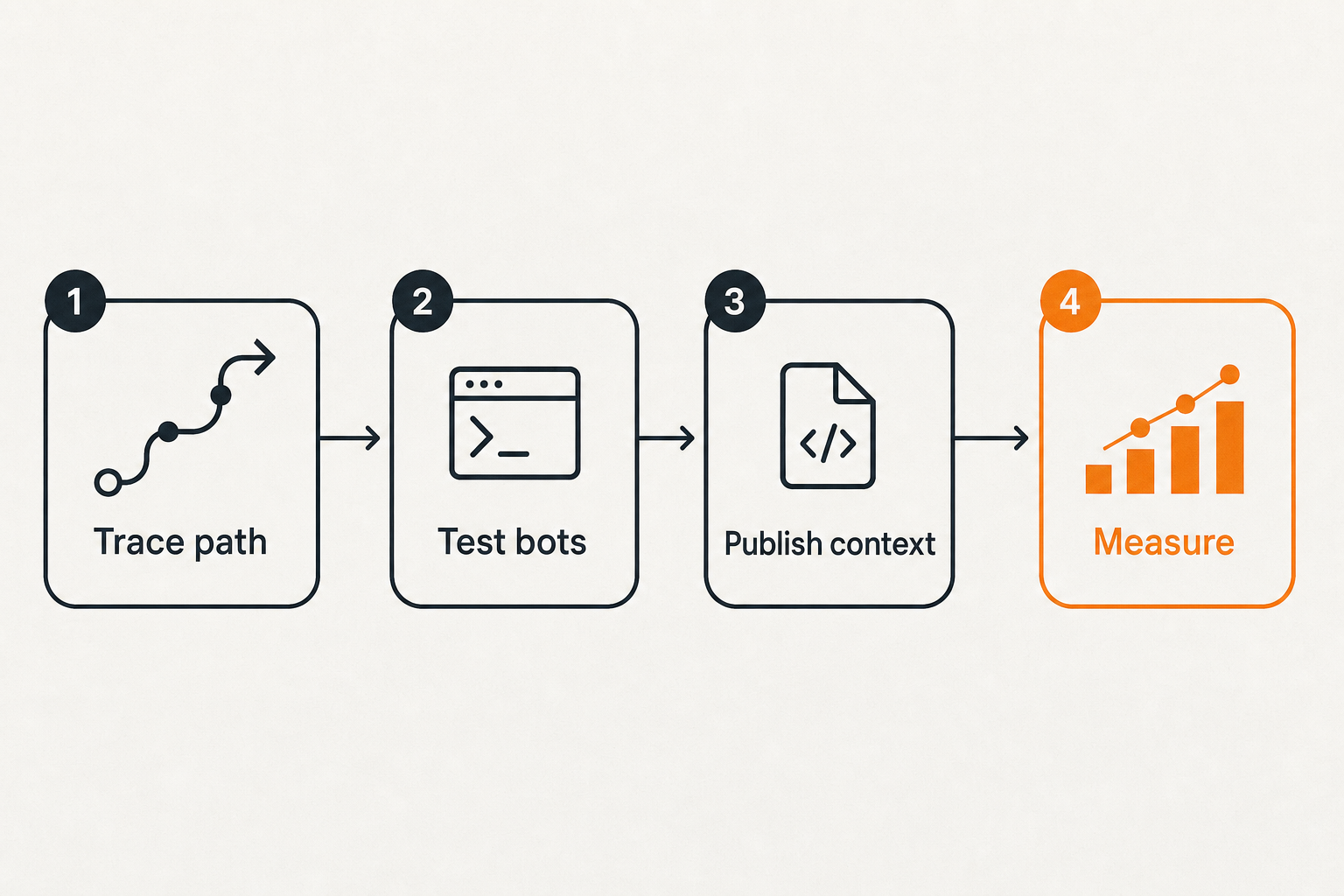
Begin with the production URL, not the repository. Pick five page types: homepage, product page, documentation page, blog article, and support or FAQ page. For each one, trace the crawler path through DNS, load balancer, security layer, cache, proxy, VM, framework, and response.
Document the result in plain language. Example:
- Public URL: /docs/integrations
- Canonical URL: /docs/integrations
- Load balancer: external HTTPS
- Security policy: bot allowlist plus rate limit
- Cache: CDN, 30 minute HTML TTL
- Backend: managed instance group
- Rendering: server-side
- AI crawler status: 200 for approved agents
- Primary content in HTML: yes
- Schema: Article plus BreadcrumbList
This sounds basic. It is often the first time SEO, engineering, and content teams agree on what is actually being served.
Step 2: test crawler-specific retrieval
Do not only test with a normal browser. Use command-line requests and crawler simulation tools. Compare responses for different user agents. Watch status codes, redirects, body size, and content differences.
A simple test pattern:
curl -I https://example.com/page
curl -A GPTBot https://example.com/page
curl -A ClaudeBot https://example.com/page
curl -A PerplexityBot https://example.com/page
curl -A Googlebot https://example.com/page
Then compare the HTML body, not just the status code. A 200 response that returns a JavaScript shell with no main content is not the same as a 200 response with a clean article.
Be careful with fake user-agent testing. Serious verification should also use logs and known crawler behavior, because user agents can be spoofed. The point is to catch obvious policy and rendering differences early.
Step 3: publish machine-readable context
Once retrieval works, publish context that helps answer engines understand the site. This includes clean internal linking, schema markup, sitemaps, and optionally llms.txt.
A simple llms.txt style outline might include:
# Example Site

## Core pages
- Product overview: https://example.com/product
- Pricing: https://example.com/pricing
- Documentation: https://example.com/docs

## Best explanatory articles
- What the product does: https://example.com/blog/product-guide
- Integration guide: https://example.com/blog/integration-guide
Keep this file boring and accurate. Do not stuff it with every URL. Do not include pages you would be embarrassed to see cited.
Related reading from our network: private workflow design has similar control-plane problems, and IRS secure messaging in 2026 is a useful adjacent example of access, records, attachments, and operational boundaries.
Step 4: measure and assign ownership
After deployment, assign ownership for each layer. Engineering owns request path and response integrity. SEO owns crawl policy, canonical strategy, and technical search alignment. Content owns clarity, freshness, and answer quality. Security owns bot risk. Leadership owns the policy tradeoff between exposure and control.
Create one shared AEO board with tasks like:
- Verify AI crawler access to priority URLs.
- Fix blocked or inconsistent response paths.
- Add schema to pages with clear entity value.
- Publish or update llms.txt.
- Validate sitemap and canonical alignment.
- Monitor logs for approved crawlers.
- Re-audit after major releases.
The mistake teams make is spreading these tasks across five backlogs with no owner for the outcome.
Common failure modes when teams implement this badly
Blocking LLM crawlers with generic bot defense
Security teams are right to distrust automation. The web is full of abusive bots. The failure mode is treating all non-browser automation as the same thing.
A WAF rule that blocks unknown user agents might stop spam. It might also block legitimate AI crawlers. A JavaScript challenge might reduce scraping. It might also prevent retrieval systems from seeing the page. A rate limit might protect the backend. It might also throttle important content fetches during a recrawl.
The fix is not to open the gates. The fix is policy segmentation. Decide which crawlers matter, what they can access, how often they can request, and where the logs go.
Shipping app states instead of content
Modern frameworks make it easy to ship pages where the meaningful content is assembled client-side. That can work for users and fail for crawlers.
Common patterns that break extraction:
- Empty root div with all content loaded after JavaScript.
- Product copy pulled from APIs that block crawler-like requests.
- FAQ content hidden until user interaction.
- Infinite scroll with no crawlable pagination.
- Documentation rendered only after authentication checks.
- Soft 404 pages returning 200 status.
For AEO, the initial HTML should carry enough meaning to stand on its own. If the crawler never executes the app, it should still understand the page topic, core answer, publisher, and important links.
Losing attribution across proxies and caches
GCE stacks often use multiple proxy layers. Each layer can hide or overwrite useful request context. If logs only show the load balancer IP, you may not know which crawler visited. If cache hits are not logged with user agent details, you may miss most successful retrievals. If backend logs differ from edge logs, investigations become slow.
Preserve headers carefully. Configure trusted proxy chains. Make sure edge logs and app logs can be joined by timestamp, path, request ID, or trace ID.
What breaks in practice is not one catastrophic outage. It is slow uncertainty. The content team asks whether AI crawlers saw the new guide. Engineering says the app is up. Security says no incidents. Nobody can answer the actual question.
What works and what fails
What works
What works is boring infrastructure discipline connected to content discipline.
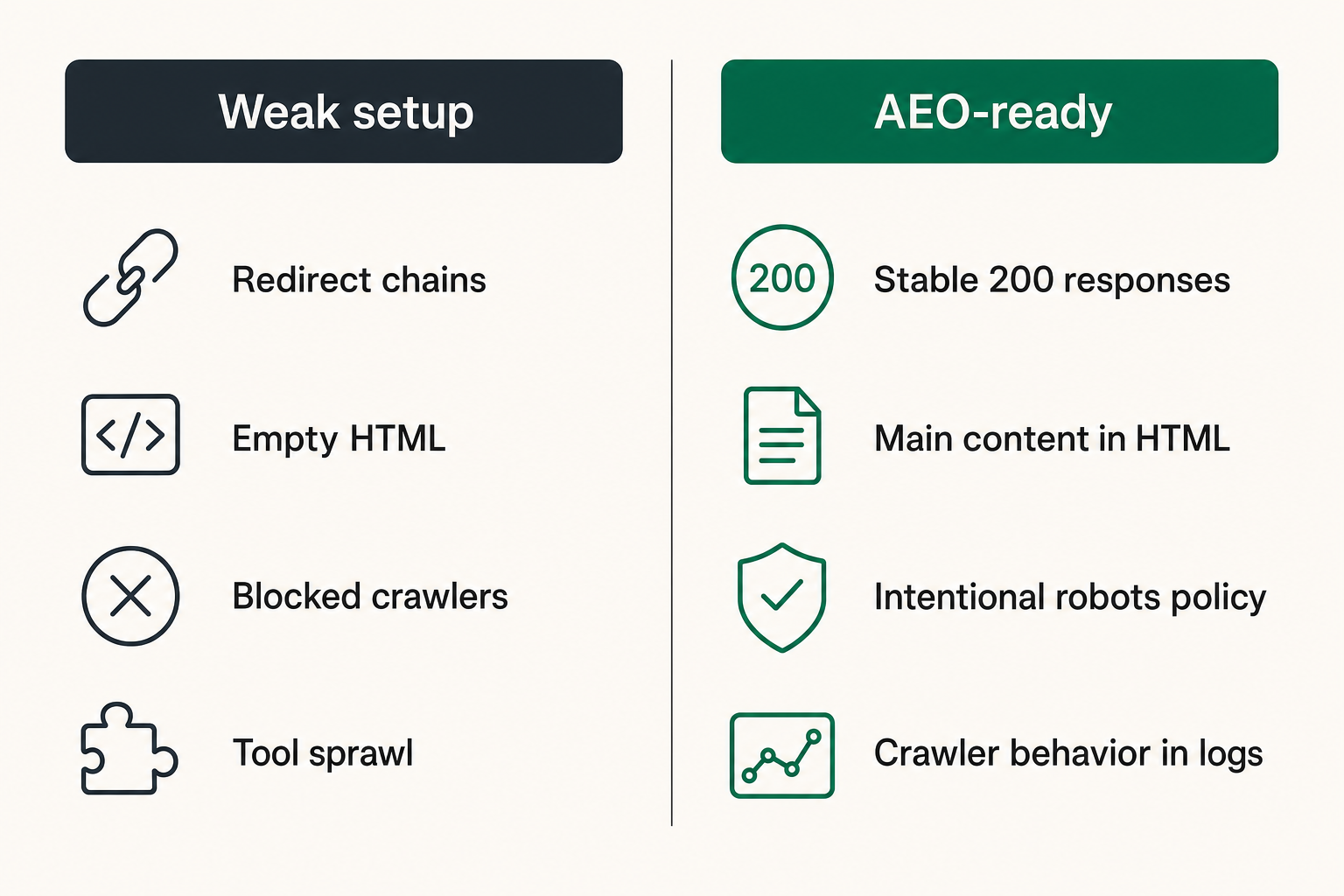
Good AEO on Google Compute Engine usually looks like this:
- Important pages return stable 200 responses.
- Main content is present in server-rendered or static HTML.
- Robots policy is intentional and documented.
- AI crawler behavior is visible in logs.
- Schema matches visible content.
- llms.txt points to the best explanatory pages.
- Sitemaps and canonicals agree.
- Security rules distinguish trusted crawlers from abusive automation.
- Releases include crawler regression checks.
This is not hype. It is an operating model.
What fails
What fails is treating AEO as a content-only project or an infrastructure-only project.
Content-only fails because writers cannot fix blocked crawlers, empty HTML, redirect chains, or broken schema deployment. Infrastructure-only fails because developers can serve technically perfect pages that do not answer real questions clearly enough to be cited.
Another failure pattern is tool sprawl. One team monitors SEO. Another monitors uptime. Another manages robots. Another deploys schema. Another reviews security rules. Each tool is correct in isolation, but nobody sees the crawler journey end to end.
A simple comparison table
| Treat GCE as the AEO solution | Uptime and scalability | Content may still be blocked or unclear | Test crawler retrieval and extraction |
| Allow all bots | Maximum exposure | Scraping, load, risk | Segment known crawlers and monitor behavior |
| Block all unknown automation | Security posture | Legitimate AI retrieval may fail | Define explicit AI bot policy |
| Rely only on JavaScript rendering | User experience | Weak crawler extraction | Put core answer content in HTML |
| Add schema everywhere | Machine-readable markup | Contradictions and noise | Use schema where it confirms visible facts |
| Publish llms.txt without review | AI-facing map | Points crawlers to weak pages | Curate priority pages and audit them |
Practical rule: The best AEO stack is not the most complex stack. It is the stack where crawler access, content extraction, and business policy are observable.
Measurement: proving AI crawlers can cite your content
Access metrics
Access metrics answer the first question: did the crawler reach the page?
Track these for priority URL groups:
- requests by crawler user agent
- 200, 301, 302, 403, 404, 429, and 5xx rates
- response size by crawler class
- cache hit ratio for crawler requests
- redirect chains by path
- robots and WAF decisions
- time since last successful fetch
Do not overfit to one crawler. AI discovery is fragmented. Build a view that can group known AI agents while still showing unknown automation separately.
Extraction metrics answer the second question: what did the crawler likely see?
Useful checks include:
- main content present in raw HTML
- title and H1 alignment
- visible author or organization signal
- canonical URL correctness
- schema validity and consistency
- internal links to supporting pages
- content length appropriate to intent
- absence of intrusive interstitials or login walls
This is where a page can be up but still fail. A 200 status code is not an answer-ready page.
Citation-readiness metrics
Citation-readiness is harder to measure because answer engines do not expose a simple ranking report. Still, you can evaluate whether a page is likely to be useful as a source.
Look for:
- clear answer in the opening section
- specific claims with context
- comparison tables where decisions are involved
- updated dates where freshness matters
- named products, standards, people, and organizations
- concise summaries that can be extracted without distortion
- supporting pages that reinforce the same entity story
Many teams on the CrawlProof blog are working through this shift from ranking reports to answer-readiness checks because AI answer engines compress the funnel before a user ever clicks.
Related reading from our network: community operators face a similar measurement issue when routing asks, offers, trust, and follow-up, which is why how to run a local community network is a useful adjacent operating-model read.
Operating model for SEO, developers, and content teams
Ownership map
AEO breaks when ownership is vague. Create a simple map.
- Developers own rendering, status codes, redirects, headers, performance, and deployment safety.
- SEO owns crawl directives, canonical strategy, sitemap quality, and search alignment.
- Content owns page clarity, freshness, topical coverage, and answer quality.
- Security owns bot policy, rate limits, WAF rules, and abuse monitoring.
- Product or leadership owns the risk decision around AI visibility.
The practical question is not who gets credit. It is who gets paged when important content becomes unavailable to crawlers.
Release checklist
Add AEO checks to the release process for GCE-hosted sites. Keep it short enough that teams will actually use it.
Before release:
- Confirm priority URLs return correct status codes.
- Compare browser view with raw HTML.
- Validate canonical and meta robots tags.
- Validate schema against visible content.
- Test at least one AI crawler user agent path.
- Confirm robots.txt and llms.txt are still reachable.
- Review redirects for changed URLs.
- Check logs after deployment.
A release that changes templates, routing, security policy, CDN behavior, or rendering should trigger this checklist.
Incident response
AEO incidents rarely look like outages. The site is up. Revenue pages load. Dashboards are green. But crawlers are blocked, schema disappears, or documentation returns thin HTML.
Define incident triggers:
- sudden 403 or 429 increase for known crawlers
- priority pages missing main content in HTML
- robots.txt accidentally disallowing key paths
- llms.txt returning 404 or stale URLs
- canonical tags pointing to wrong environments
- schema removed from important templates
- CDN serving old noindex pages
Then define response owners. Security fixes policy mistakes. Developers fix rendering and routing. SEO fixes directives. Content fixes weak or stale answer pages.
How CrawlProof fits into a Google Compute Engine AEO workflow
Audit the page the way AI crawlers see it
CrawlProof is built for the gap this article keeps circling: the difference between what humans see in a browser and what AI crawlers can actually find. That matters whether your site runs on Google Compute Engine, another cloud, a static host, or a custom stack.
The product fit is architectural, not magical. You use CrawlProof to inspect pages for AEO signals: content visibility, schema, robots rules, AI-bot access, positioning, and the practical issues that affect whether answer engines can understand and cite the page.
For a GCE-hosted site, that gives operators a shared artifact. Engineering can see retrieval and markup problems. Content can see whether the answer is clear. SEO can see policy and schema issues. Leadership can see what is blocked, missing, or ambiguous.
Turn findings into deployable work
The output should become work items, not a vanity score. A useful audit turns into tickets like:
- expose primary article content in server-rendered HTML
- fix Organization schema on product pages
- remove accidental noindex from documentation
- align sitemap with canonical URLs
- update llms.txt to include only priority explainers
- adjust WAF policy for approved AI crawlers
- add logging fields for crawler status and response size
That is the workflow. Audit, fix, deploy, validate, monitor. Google Compute Engine gives you the infrastructure control to make those fixes. AEO tooling tells you whether the fixes matter from the crawler perspective.
If you want to see the issue directly, run a page through CrawlProof and compare the audit with what your team assumes AI crawlers can see.
Google Compute Engine can be an excellent foundation for a serious web property. But for answer engine optimization, the foundation is not enough. The closing question is simple: when an AI answer engine asks for your page, does your Google Compute Engine stack return something worth citing?
Try crawlproof.com
CrawlProof helps site owners and marketers understand how AI answer engines and LLM crawlers discover, read, and cite their content. Try crawlproof.com