Your website can rank, load fast, and still disappear inside AI answers. That is the uncomfortable part of an insight engine strategy in 2026.
Teams think the problem is visibility in search results. The real problem is whether answer engines can crawl, interpret, trust, and reuse your content when there is no blue-link page view to win.
The mistake teams make is treating insight engine work as another keyword project. They add a glossary page, publish a few AI-friendly posts, and wait. Nothing meaningful changes because the workflow is still built for SERPs, not for extraction, citation, and answer assembly.
A useful way to think about it is this: your website is no longer just a destination. It is a source system for machines that summarize the web. That changes the conversation from content production to architecture, governance, and validation.
Table of contents
Why an insight engine is an AEO architecture problem
The old SEO mental model is too page centric
Traditional SEO assumes a searcher enters a query, sees a results page, chooses a link, and lands on your site. That still happens. It still matters. But it is no longer the only discovery path that matters.
AI answer engines often behave differently. They collect candidate sources, extract assertions, compare them against other sources, and generate a response. Sometimes the user clicks. Often they do not. Your content may still influence the answer, but only if the engine can parse it and decide it is useful.
That means the page is not the only asset. The asset is the set of facts, entities, relationships, policies, pricing details, product claims, comparisons, definitions, and evidence that a machine can safely reuse.
If your workflow only asks whether a page ranks, you miss the operational question: can a crawler see the same content a human sees, and can an answer engine understand why that content should be cited?
The new unit is the answerable claim
An insight engine does not need your entire homepage. It needs answerable units. Examples:
- What your product does.
- Who it is for.
- Which problem it solves.
- What evidence supports the claim.
- How it compares with alternatives.
- Which constraints, pricing rules, or implementation steps apply.
This is where AEO becomes different from ordinary content marketing. If you are still new to the framing, CrawlProof has a short primer on why AEO is not just SEO with a new label. The practical takeaway is that answer engines reward clarity at the claim level, not just topical coverage at the page level.
Practical rule: If a human editor cannot copy one sentence from your page and know what it proves, an insight engine will probably struggle to use it as a citation.
What changes for owners and developers
For site owners, the work becomes less about publishing volume and more about source quality. For SEO teams, it means auditing structure, schema, and extractability. For developers, it means making sure bots can access the content without accidentally exposing private or low-quality areas.
The practical question is not whether AI search is good or bad. The practical question is whether your site is usable by the systems that now sit between your content and your market.
What an insight engine needs to see before it can cite you
Crawl access and rendering
Before an answer engine can cite you, a crawler has to fetch the content. That sounds obvious until you inspect production sites.
What breaks in practice is usually basic:
- Important pages are blocked in robots.txt.
- AI crawler user agents are treated like unknown bots and rate-limited aggressively.
- Content renders only after client-side JavaScript execution.
- Canonical tags point to thin or outdated versions.
- Cookie banners or geolocation logic hide the real page.
- APIs return empty states to bot sessions.
A useful first pass is to test pages as a crawler, not as a logged-in marketer. Fetch the raw HTML. Fetch the rendered DOM. Compare both with what a human sees.
Entity clarity and source trust
Answer engines need to know who is speaking. Many sites are vague here. They have strong content, but weak identity signals.
At minimum, make the following easy to identify:
- Organization name and alternate names.
- Product names and categories.
- Authors or reviewers for expert content.
- Contact, location, or legal details where relevant.
- Same-as links to durable profiles.
- Clear relationship between brand, product, and content hub.
This is not about stuffing the footer with badges. It is about reducing ambiguity. If your company, product, and topic expertise are hard to connect, your content becomes a weaker candidate source.
Schema that matches visible content
Schema markup helps, but only when it describes content that is actually visible on the page. Many teams treat structured data as a way to smuggle assertions into the page. That is fragile.
Use schema to reinforce:
- Article metadata.
- Organization identity.
- Product attributes.
- FAQ content that is visible to users.
- Breadcrumbs and page hierarchy.
- Author and review relationships where legitimate.
Practical rule: Schema should confirm the page, not compensate for it. If the markup says one thing and the visible page says another, you are building distrust into the system.
The insight engine workflow from page to answer
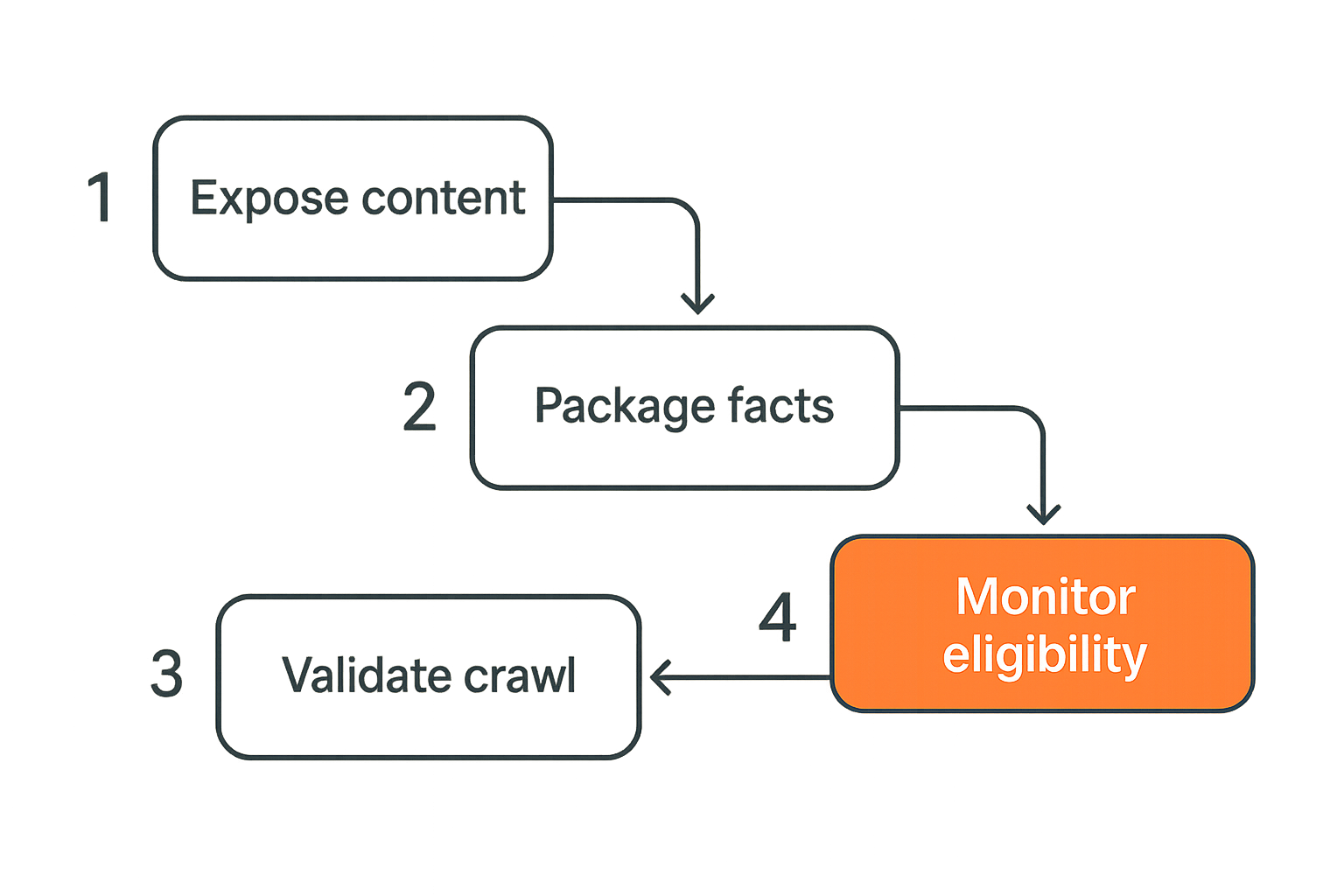
Step 1 expose clean content
The first job is exposure. Can the crawler get the content without needing a human browser session, login state, or fragile script execution?
Start with priority pages: homepage, product pages, core educational content, pricing, comparison pages, and support docs. For each page, capture three versions:
- Raw HTML response.
- Rendered DOM after scripts execute.
- Human-visible screenshot or text extraction.
Compare them. The gap is your first AEO backlog.
If the page says everything in the browser but nothing in the HTML, you have a dependency risk. If the rendered DOM includes duplicate navigation, hidden tabs, or stale content, you have extraction noise.
Step 2 package facts and relationships
The second job is packaging. Answer engines need relationships, not just paragraphs.
A product page should communicate:
- Product name.
- Category.
- Primary use case.
- Target audience.
- Key features.
- Constraints.
- Pricing or pricing model, if public.
- Integration points.
- Support or trust signals.
A blog post should communicate:
- Topic.
- Author or publisher.
- Updated date.
- Core answer.
- Supporting sections.
- Related entities.
- Next action.
This does not require robotic writing. It requires consistency. Put the same entity names in headings, body copy, schema, navigation, and internal links.
Step 3 validate crawler visibility
Validation is where many teams fall down. They publish, inspect a visual page, and assume machines see the same thing.
Instead, create a repeatable check:
- Fetch as common crawler user agents.
- Check robots and meta robots directives.
- Confirm canonical target.
- Extract visible text.
- Extract structured data.
- Compare extracted claims with intended claims.
- Record failures in a shared backlog.
Related reading from our network: DevSecOps teams face a similar gating problem when scanners, secrets, and policy checks have to run in CI/CD instead of living as one-off audits. The AEO version is the same operating lesson: validation has to be in the workflow, not in somebody's memory.
Step 4 monitor answer eligibility
Eligibility is not the same as citation. You cannot force an answer engine to cite you. You can make your pages eligible, reduce ambiguity, and monitor whether crawler access and source quality stay intact.
Track whether priority pages remain crawlable, whether structured data remains valid, whether content dates drift, and whether new templates accidentally hide important text.
The mistake teams make is treating insight engine optimization as a launch project. In production, templates change, plugins update, marketing tests add scripts, and robots rules get edited. Eligibility decays unless someone owns it.
Insight engine optimization versus traditional SEO
Where SEO still matters
SEO fundamentals still matter because answer engines often use web-scale signals that overlap with search. Authority, links, topical depth, crawlability, site speed, canonicalization, and content quality still affect whether your site is considered a good source.
Do not throw away your SEO program. The point is to extend it.
Search engines and answer engines both need clean pages. Both prefer coherent sites. Both punish confusion. AEO adds another layer: the content must be extractable and reusable in generated answers.
Where AEO diverges
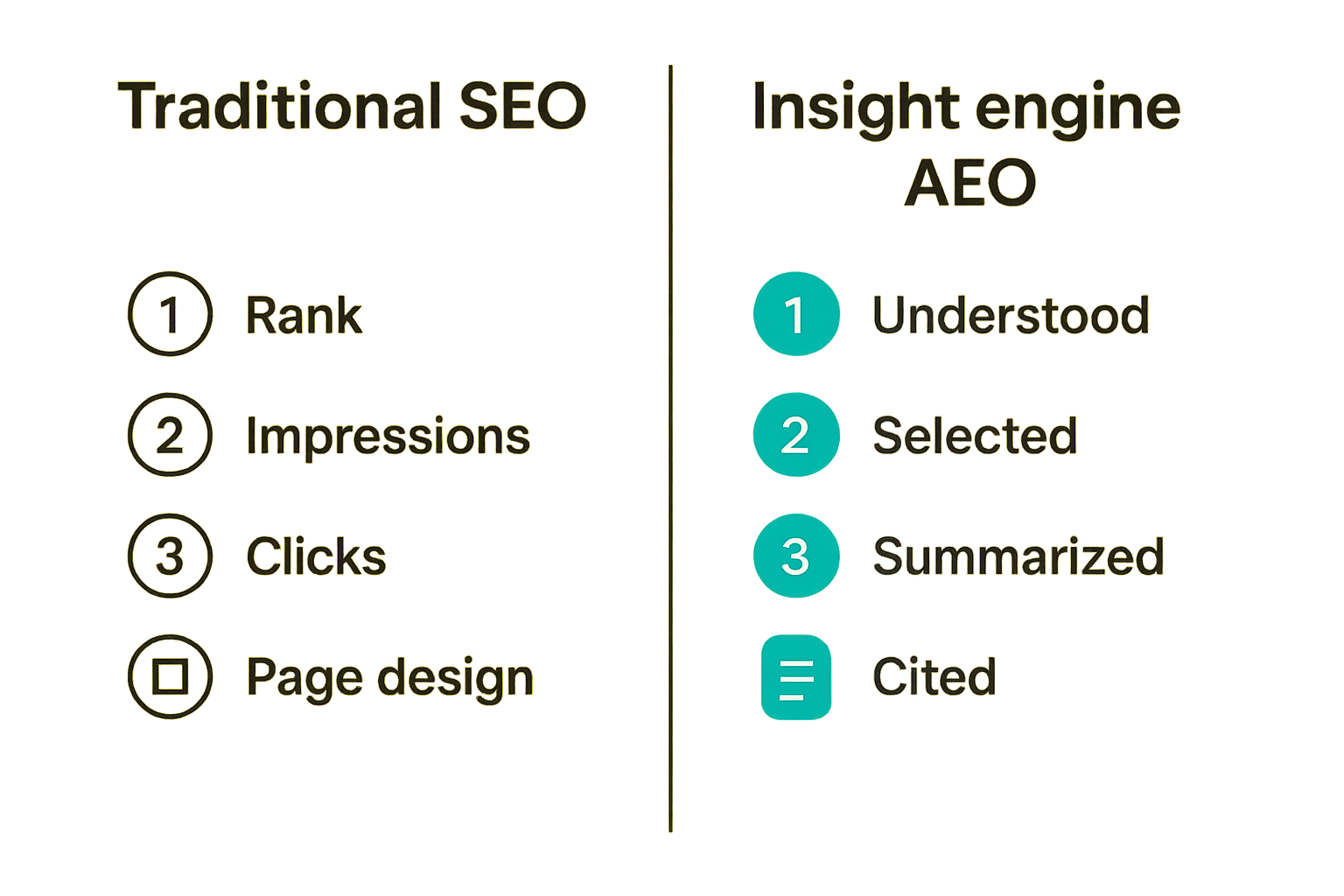
AEO diverges where the success event changes. SEO often optimizes for ranking, impressions, and clicks. AEO optimizes for being understood, selected, summarized, and cited.
That changes the page design. A classic SEO article may bury the answer after a long introduction. An insight engine-friendly page should make the core answer easy to locate while still giving depth below it.
That also changes reporting. If your only KPI is organic sessions, you may miss cases where AI answers use your content but send fewer clicks. You may also miss the opposite case: pages getting traffic but not being understood well enough to influence answer results.
A practical comparison table
| Primary goal | Rank and earn clicks | Be discovered, understood, cited, and trusted |
| Main unit | Page or keyword | Answerable claim and entity relationship |
| Technical check | Crawl, index, canonical, speed | Crawl, render, extract, schema, AI bot access |
| Content structure | Topic coverage and intent match | Clear claims, provenance, constraints, reusable summaries |
| Measurement | Rankings, impressions, clicks | Crawl visibility, extractability, citation readiness, answer presence |
| Failure mode | Low ranking | Invisible or unusable source despite good content |
Practical rule: Treat SEO as the distribution layer and AEO as the source-quality layer. You need both, but they fail in different ways.
Build the content layer for machine readable answers
Write pages around decisions not keywords
Keyword research is still useful, but it is not enough. Users ask answer engines for decisions: which tool to use, what a concept means, whether a feature matters, how to implement something, which risk to avoid.
So structure pages around decisions. A good page should answer:
- What is the problem?
- Who has it?
- What are the options?
- What should the reader do first?
- What breaks if they do it badly?
- What evidence or constraints matter?
This is especially important for product and service pages. A page that only says you are innovative and trusted gives an insight engine almost nothing to cite. A page that says exactly what you do, for whom, under which constraints, and with which implementation steps is far more useful.
Related reading from our network: local organizers building a first community face the same routing problem of asks, offers, trust, and follow-up. Different niche, same architecture pattern: vague intent does not coordinate action; explicit structure does.
Machine-readable does not mean ugly. It means predictable.
What works:
- Descriptive H2 and H3 headings.
- Short summaries near the top of pages.
- Tables for comparisons, pricing, requirements, and tradeoffs.
- Bullets for feature lists and implementation steps.
- Consistent product and company names.
- Clear definitions before nuance.
What fails:
- Clever headlines that hide the topic.
- Long unbroken essays with no extractable structure.
- Claims split across modals, tabs, and carousels.
- Important details locked in images.
- Pages where the title, H1, schema, and navigation all use different names.
The goal is not to write for robots instead of people. The goal is to stop making robots guess what people can infer.
Keep freshness and provenance visible
Freshness matters more when answer engines assemble responses from multiple sources. If your page has no date, no update history, and no author or publisher context, the system has fewer reasons to trust it for current topics.
You do not need to turn every page into a research paper. But you should expose operational provenance:
- Published date and updated date.
- Author, editor, or organization.
- Product version where relevant.
- Market or geography where relevant.
- Clear distinction between current facts and historical context.
For evergreen pages, update when something material changes. For technical docs, tie pages to versions. For pricing and policy pages, make the effective date obvious.
Build the technical layer for AI crawlers
Robots rules and bot access
The robots layer is where good intentions can break everything. Some teams block unknown bots to reduce scraping. Others allow everything and create risk. The practical middle is deliberate access.
A simple robots pattern might look like this:
User-agent: *
Disallow: /admin/
Disallow: /cart/
Disallow: /account/
Allow: /

Sitemap: https://example.com/sitemap.xml
Then audit whether AI-related crawlers can reach the pages you actually want discovered. Do not blindly open private, gated, account, or checkout paths. Do not blindly block every unfamiliar bot either.
Practical rule: Crawler access is a product decision, not just a security default. Decide which content should be discoverable, then enforce that decision consistently.
llms txt and site guidance files
Emerging guidance files such as llms.txt give site owners a way to point AI systems toward useful content and explain how the site is organized. The standard is still young, and support varies, so do not treat it as magic. Treat it as a low-cost routing layer.
A lightweight llms.txt file can include:
# Example Company

## Primary content
- Product overview: https://example.com/product
- Documentation: https://example.com/docs
- Pricing: https://example.com/pricing
- Research: https://example.com/blog

## Preferred descriptions
Example Company provides workflow software for regional service teams.
If you want the deeper version, CrawlProof has a practical guide to llms.txt and skill.md for AI crawler guidance. The important point is not the file itself. The important point is intentional routing.
JavaScript rendering and blocked assets
Modern sites often depend on JavaScript for content, navigation, personalization, and tracking. That is fine until the crawler gets an empty shell.
Check for these issues:
- Server response contains mostly script tags and no meaningful copy.
- Core content loads from APIs blocked by CORS, auth, or bot rules.
- Lazy-loaded sections never appear without scrolling behavior.
- Tabs or accordions hide important claims from extraction tools.
- CSS or JS assets are blocked, breaking layout interpretation.
Related reading from our network: media and streaming operations have similar IT tradeoffs around access, privacy, troubleshooting, and legal workflows. For AEO teams, the parallel is that user experience is not the whole system; access paths and operational constraints decide what actually works.
Measurement for an insight engine program
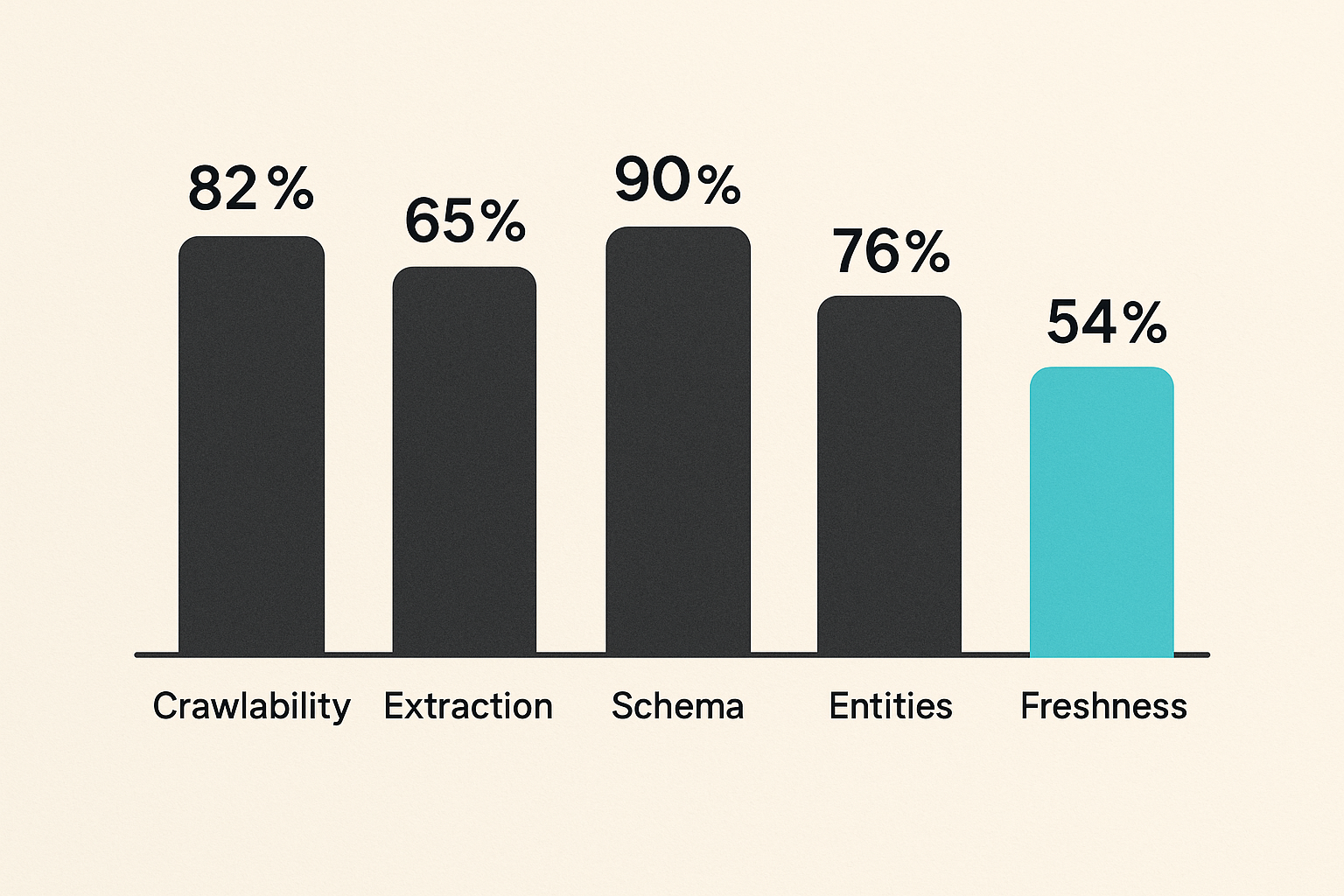
Signals that matter
You cannot measure an insight engine program only with traffic. You need signals closer to the source system.
Useful signals include:
- Priority page crawlability by bot type.
- Raw HTML content coverage.
- Rendered text coverage.
- Structured data validity.
- Schema-to-visible-content alignment.
- Presence of key entities and claims.
- Freshness of high-value pages.
- Sitemap inclusion and canonical consistency.
- Server errors or rate limits for crawlers.
- Mentions or citations in AI answer surfaces where observable.
Some of these are deterministic. Some are directional. That is fine. The job is to reduce blind spots.
Metrics that mislead
Several familiar metrics become noisy in AEO work.
Organic sessions can go down while answer influence goes up. Rankings may stay stable while AI crawlers fail to extract your updated product positioning. Valid schema counts may rise while the visible page becomes thinner. Content volume may increase while answer eligibility decreases.
The mistake teams make is choosing metrics because the tools already report them. For insight engine work, you need to ask what the metric proves operationally.
If a number does not tell you whether the page can be crawled, understood, trusted, or cited, it is probably a secondary metric.
A lightweight dashboard
A practical dashboard does not need to be complicated. Start with a page-level table for your top 50 to 200 URLs.
Track:
| URL | The asset being tested |
| Page type | Product, article, docs, pricing, comparison |
| Intended answer | The question this page should help answer |
| Crawl status | Whether bots can fetch it |
| Text extraction score | Whether core content is visible to machines |
| Schema status | Valid, missing, mismatched, or stale |
| Entity coverage | Whether brand, product, author, and topic are clear |
| Last reviewed | Whether ownership is current |
| Failure owner | SEO, content, engineering, legal, or product |
This forces the right conversation. Instead of arguing about AI hype, the team can see which pages are eligible, which are broken, and who owns the fix.
Failure modes that break answer engine visibility
The content exists but cannot be trusted
This is the most frustrating failure mode because the team did the hard writing work. The page is useful, but the source signals are weak.
Common causes:
- No clear publisher identity.
- No author or reviewer on expert content.
- No date on time-sensitive pages.
- Conflicting product descriptions across pages.
- Unsupported claims with no explanation.
- Thin about, contact, or policy pages.
What works is boring consistency. Make the organization, product, topic, and claim relationships obvious across the whole site.
What fails is cosmetic trust. A badge, stock photo, or vague testimonial does not fix unclear ownership.
The crawler can fetch but cannot understand
A 200 status code does not mean the page is usable. The crawler may fetch the URL and still extract junk.
This happens when:
- Navigation overwhelms the main content.
- Duplicate boilerplate appears before the answer.
- The primary copy is injected late or hidden.
- The page uses ambiguous headings.
- Tables are rendered as images.
- Internal links point to canonical confusion.
The practical fix is to inspect extraction output. Do not only check browser appearance. Ask: if this extracted text were all an AI system saw, would it understand the page?
The team optimizes snippets instead of systems
Snippet hacking is the new keyword stuffing. Teams see AI answers and try to manufacture perfect quote blocks. That may create short-term tests, but it does not create a durable source system.
Insight engine work is more like infrastructure. You need templates, validation, governance, ownership, and monitoring. Otherwise every improvement decays the next time a template changes.
Practical rule: Do not optimize one paragraph for one answer. Build a site that makes correct extraction the default outcome.
Implementation sequence for site teams
Week 1 inventory and access
Start with the pages that would hurt most if answer engines ignored them.
A practical first-week sequence:
- List the top commercial and educational URLs.
- Assign an intended answer to each URL.
- Fetch each page as raw HTML.
- Render each page as a crawler would.
- Check robots, meta robots, canonical, and sitemap status.
- Identify blocked, thin, duplicated, or script-dependent pages.
- Create owners for content, engineering, and SEO fixes.
Do not audit the whole site first. That creates a spreadsheet nobody acts on. Start with the pages tied to revenue, reputation, or strategic topics.
Week 2 schema and content repair
In the second week, repair the obvious extraction problems.
For content teams:
- Add clear summaries to priority pages.
- Normalize product and brand language.
- Add missing dates and ownership signals.
- Convert image-only information into text.
- Replace clever headings with descriptive ones where clarity matters.
For developers:
- Add or repair Article, Organization, Product, Breadcrumb, and FAQ schema where appropriate.
- Make sure schema reflects visible content.
- Move critical copy into server-rendered or reliably rendered markup.
- Reduce unnecessary duplication in templates.
- Confirm canonical and sitemap behavior.
For SEO owners:
- Map pages to target answer questions.
- Flag cannibalized or contradictory pages.
- Prioritize fixes by business value.
- Document acceptance criteria.
Week 3 validation and operations
In the third week, move from cleanup to operating model.
Define a recurring workflow:
- New page goes live.
- Crawl access check runs.
- Extraction check runs.
- Structured data check runs.
- Intended answer is reviewed.
- Failures route to the right owner.
- High-value pages are rechecked after template or CMS changes.
This is where the work becomes durable. You are not trying to predict every answer engine behavior. You are making sure your source system stays clean enough to be considered.
Product fit crawlproof in the insight engine stack
What CrawlProof checks
CrawlProof is built for site owners and marketers who need to see what AI crawlers and answer engines can actually find on a page. That means looking past the browser view and into the signals that determine whether content is discoverable and usable.
It checks the practical layer: content visibility, schema, robots rules, AI-bot access, and positioning. The goal is not to claim guaranteed citations. No serious tool can promise that. The goal is to expose the gaps that make citation unlikely.
That changes the conversation. Instead of asking whether AI search is replacing SEO, teams can ask which pages are ready, which are blocked, and which fixes matter first.
Where it sits in the workflow
CrawlProof fits between content strategy, technical SEO, and engineering. Use it before a page launch, after a template change, during an AEO audit, or when a priority page is not showing up the way you expect in AI answers.
For non-engineers, it translates crawler visibility into a reviewable report. For developers, it points toward specific technical failure modes. For SEO teams, it adds an AEO layer to the existing crawl and content workflow.
The practical question is not whether you need another dashboard. The practical question is whether you know what AI crawlers can actually see. If you do not, your insight engine program is operating blind.
Try crawlproof.com
CrawlProof helps site owners and marketers understand how AI answer engines and LLM crawlers discover, parse, and cite their content. Use it to audit your insight engine visibility and fix the gaps that matter.
Try crawlproof.com