Perplexity AI crawler website access sounds like a robots.txt setting. In production, it is usually where SEO, engineering, legal, and content teams discover they do not share the same model of how AI answer engines use a site.
The symptom is familiar: your pages rank in Google, your canonical tags are clean, your content is useful, and yet Perplexity either ignores you, cites a competitor, or pulls a thin fragment that does not represent the page. Someone asks whether PerplexityBot is blocked. Someone else checks the CDN. Then the conversation stalls.
Teams think the problem is bot access. The real problem is answer-engine readiness across access, extraction, trust, and measurement. That changes the conversation.
The practical question is not only whether Perplexity can crawl a URL. The practical question is whether Perplexity can fetch the right version, parse the useful facts, connect them to an entity, trust the page enough to cite it, and keep doing that after your next deploy.
Table of contents
Perplexity AI crawler website access is an operations problem
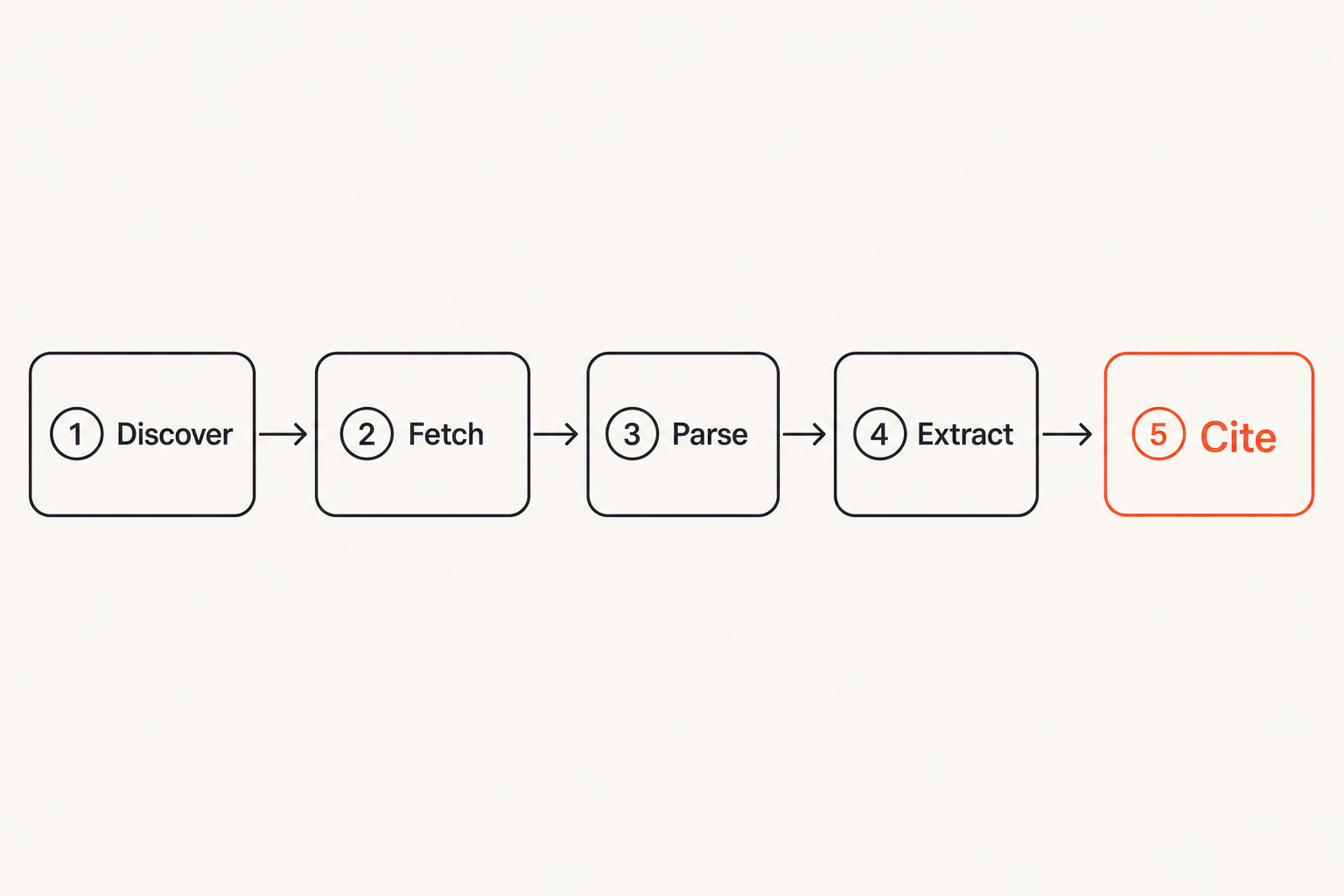
What access actually means
Access has layers. A bot can be allowed by robots.txt and still fail at the CDN. It can pass the CDN and still receive a stripped mobile template. It can receive HTML and still miss the content because the answer lives behind client-side rendering. It can parse the page and still avoid citing it because the page has weak provenance, stale dates, or conflicting schema.
A useful way to think about it is this: crawler access is the supply chain for AI citations. If one link in that chain is broken, your content may technically exist but operationally disappear.
For Perplexity and similar answer engines, access is not just permission. It is a sequence:
- Discover the URL.
- Fetch the page without being blocked or challenged.
- Receive the same canonical content a user would trust.
- Extract clear answer-ready facts.
- Connect those facts to entities, authors, dates, products, or locations.
- Revisit often enough to keep the answer current.
Practical rule: Do not ask whether a crawler is allowed until you know what the crawler actually receives.
The access decision is not binary
Many teams treat AI crawlers as either good or bad. That is too blunt for 2026. You may want Perplexity to access your public guides, product documentation, pricing pages, glossary pages, and research posts. You may not want it to access staging paths, faceted search pages, internal PDFs, duplicate print pages, or generated pages that create support risk.
The mistake teams make is setting one global rule, then hoping it matches every business case. It rarely does.
Perplexity AI crawler website access should be managed by page type and intent. A commercial SaaS site may open educational content but restrict account pages. A publisher may expose article pages but block search result pages. An ecommerce site may allow category and product pages but disallow cart, checkout, and internal recommendation endpoints.
That is an architecture decision, not a definition.
How Perplexity discovers and evaluates pages
Crawling is only the first gate
Perplexity may discover URLs through links, sitemaps, public web signals, shared citations, and other retrieval systems. The specific mechanics can change, so operators should avoid designing around one assumed path. What stays stable is the need for clean discoverability.
If your best content is orphaned, blocked in navigation, hidden behind infinite scroll, or only reachable from a JavaScript interaction, you are making the crawler guess. If your canonical URL points to a thin duplicate, you are asking the crawler to trust the wrong object. If your sitemap is stale, you are pushing old priorities into a new retrieval environment.
This is where answer engine optimization starts to diverge from classic SEO. If you need a broader framing, our primer on what AEO is and why it is not just SEO covers the shift from ranking pages to being selected as a cited answer source.
Related reading from our network: teams managing large content libraries face similar metadata and workflow pressure in media operations, which is why this guide on a safer streaming media workflow is useful as an adjacent systems comparison: streaming community ita media workflow.
Retrieval needs clean answer objects
Answer engines do not only collect pages. They retrieve passages, claims, definitions, lists, product attributes, dates, and source references. Your page needs to package those elements clearly enough that the system can use them without guessing.
What works is boring:
- Descriptive headings that match the question being answered.
- Short factual paragraphs near the relevant heading.
- Tables for comparisons, prices, specifications, eligibility, and limits.
- Clear authorship, publication date, and update date where relevant.
- Canonical internal links that clarify topic relationships.
- Schema that reinforces the visible page instead of decorating it.
What breaks in practice is the page that is visually polished but structurally vague. The crawler fetches a hero message, three abstract value propositions, and a footer. There is nothing extractable enough to cite.
The control surface: robots, firewalls, and rendering
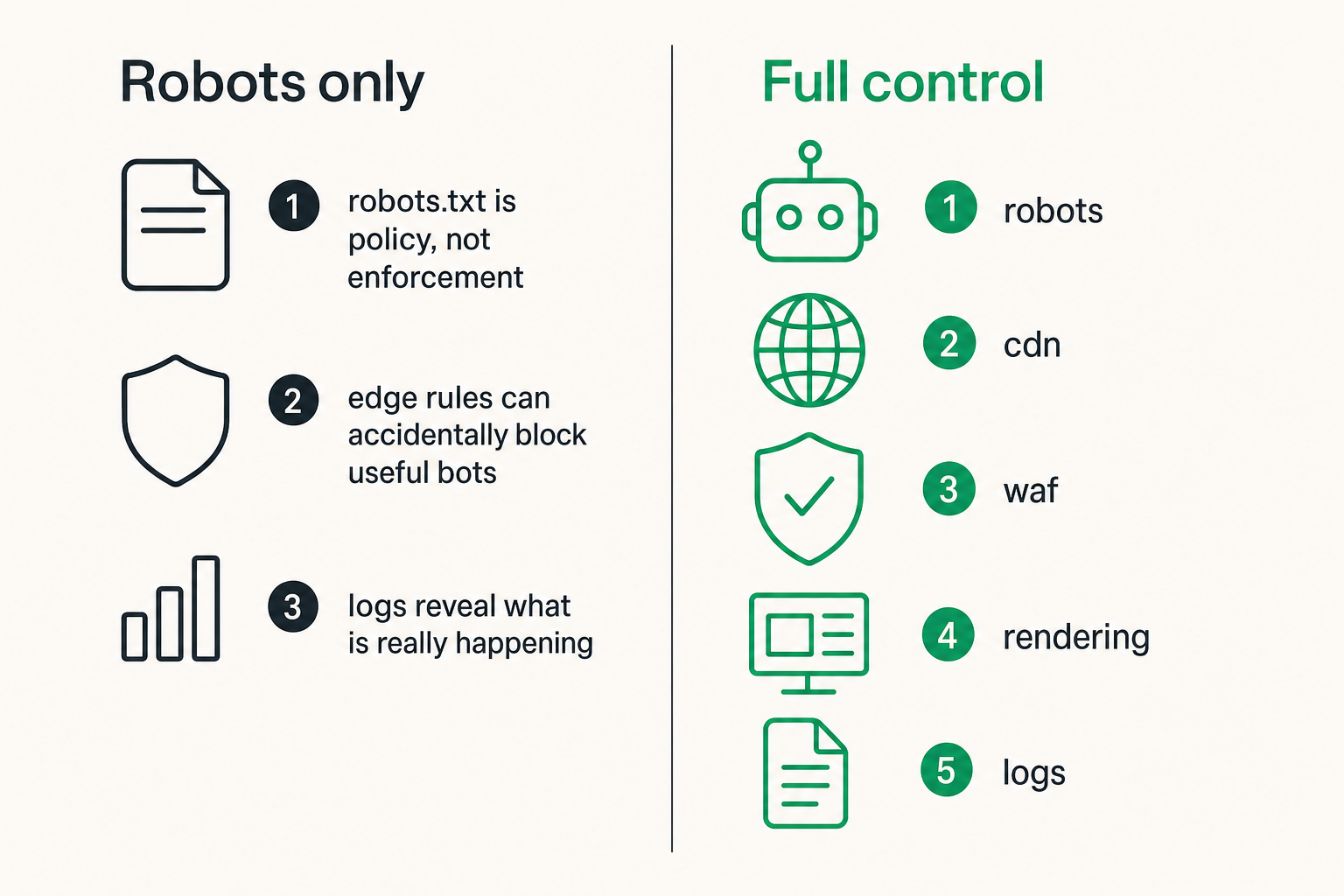
Robots.txt is policy, not enforcement
Your robots.txt file is the first place many teams look. Good. It matters. But robots.txt is only one control surface.
A simple permissive pattern might look like this:
User-agent: PerplexityBot
Allow: /

User-agent: *
Disallow: /admin/
Disallow: /cart/
Disallow: /checkout/
Disallow: /search/
Sitemap: https://example.com/sitemap.xml
A more selective pattern may allow public content while restricting operational routes:
User-agent: PerplexityBot
Allow: /blog/
Allow: /docs/
Allow: /guides/
Disallow: /app/
Disallow: /api/
Disallow: /internal/
Neither version is universally correct. The right version depends on content strategy, risk, and whether your pages are actually built to be cited.
Practical rule: Robots.txt should express business intent. Firewalls, templates, and logs should prove whether that intent is happening.
Edge rules can accidentally block useful bots
The access failure is often not in robots.txt. It is at the edge.
Common blockers include:
- Bot management tools that challenge unfamiliar user agents.
- WAF rules that block data center IP ranges too broadly.
- Rate limits tuned for abuse but applied to legitimate crawlers.
- Geo rules that serve different content by region.
- Cookie consent walls that hide the main body.
- Login redirects triggered by missing session state.
The practical question is whether PerplexityBot receives a clean 200 response with useful HTML. A 403, 429, 503, JavaScript challenge, or redirect loop is not crawler access. It is crawler theater.
Developers should test from outside the office network, without cookies, with bot-like headers where appropriate, and against the production CDN path. Testing localhost tells you nothing about what answer engines see.
JavaScript rendering is a citation risk
Client-side rendering is not automatically bad. But for AI answer engines, server-rendered or pre-rendered content is safer. If the critical answer appears only after a bundle loads, an API call returns, and the browser hydrates a component, you have added failure points.
For AEO-critical pages, prefer:
- Server-rendered article bodies.
- HTML tables for factual comparisons.
- Static links in navigation and related content.
- Visible text that matches structured data.
- Minimal reliance on interaction for core facts.
If your page needs JavaScript for the product experience, fine. Do not make JavaScript the only path to the answer.
Build an AI-crawler access inventory
Start with bot identity and route mapping
Before changing rules, inventory the system. List the crawler user agents you care about, including PerplexityBot and other LLM crawlers. Then map them to route groups.
A practical route inventory looks like this:
| Editorial content | /blog/, /guides/ | Allow | Content | Low |
| Product docs | /docs/, /help/ | Allow | Product | Medium |
| Pricing | /pricing/ | Allow | Marketing | Medium |
| Search pages | /search/ | Block | Engineering | High |
| App routes | /app/, /account/ | Block | Engineering | High |
| Checkout | /checkout/, /cart/ | Block | Product | High |
This table does two useful things. First, it turns a vague crawler debate into ownership. Second, it shows where one global robots rule is too crude.
Related reading from our network: infrastructure decisions have the same shape in payments and settlement, where the UI is only one layer and the real work is policy, state, and operations; see cloud computing crypto as a settlement layer for an adjacent architecture lens.
Log what was served, not just who visited
Most analytics tools are bad at crawler operations. They may exclude bots, sample traffic, or record a hit without showing the response body class. Server logs and CDN logs are more useful.
For each important crawler request, capture:
- Timestamp.
- User agent.
- IP and verification status where your process supports it.
- Requested URL.
- Status code.
- Redirect target.
- Cache status.
- Response size.
- Template or route group.
- Robots decision applied.
The mistake teams make is celebrating that PerplexityBot visited once. A visit is not evidence of usable access. You need to know whether it fetched the canonical content and whether the page was in a state worth citing.
Practical rule: If you cannot answer what HTML was served to the crawler, you do not have an access program. You have a hope.
What works for Perplexity access
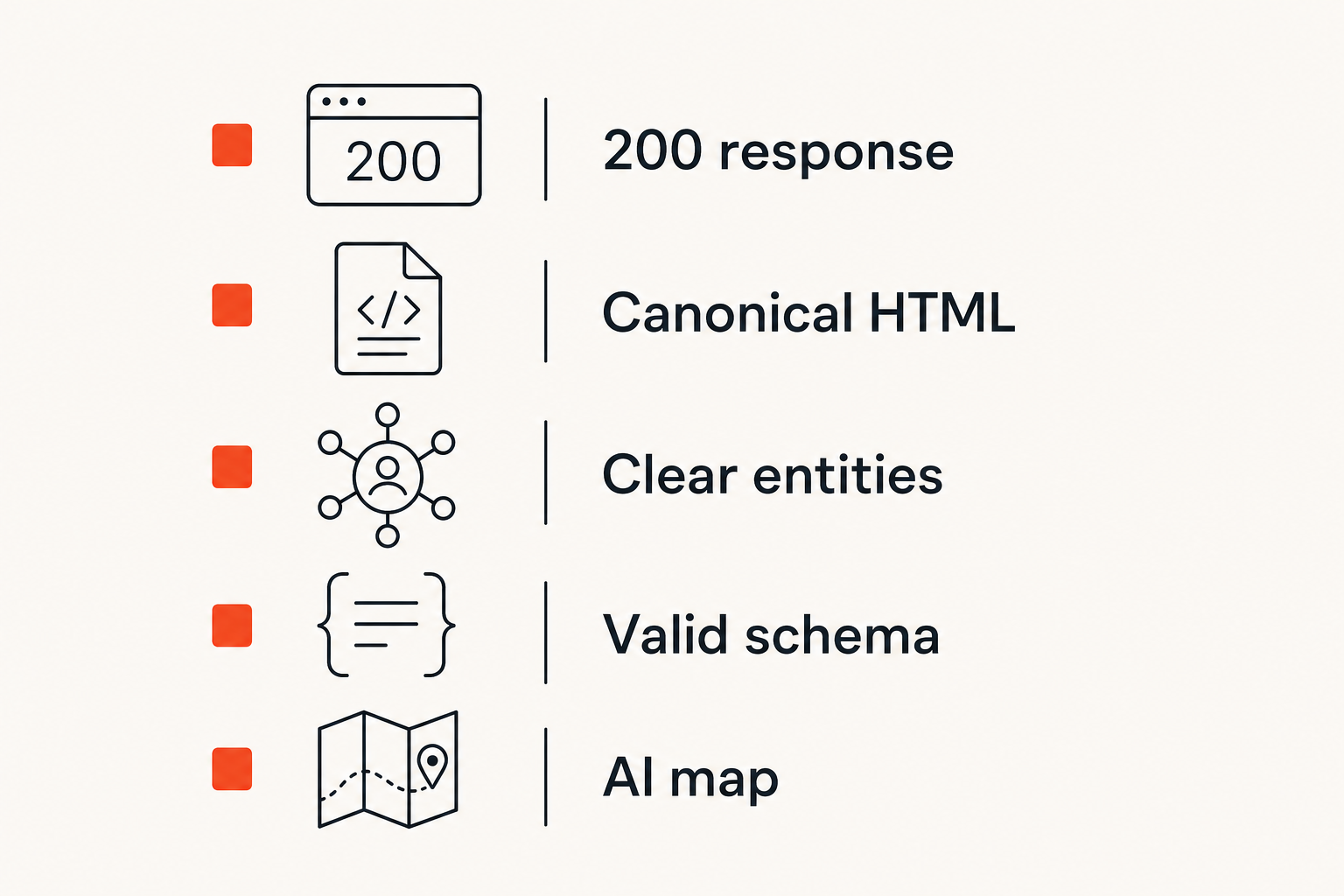
Serve fast canonical HTML
The best AEO improvements are often unglamorous. Serve the real page quickly. Keep the canonical URL stable. Avoid forcing crawlers through redirects, interstitials, personalization, or consent states that change the body.
For high-value pages, test the crawler path as if it were an API contract:
- Request the canonical URL with no cookies.
- Confirm a final
200 status. - Confirm the title, h1 equivalent, main content, and internal links are present in initial HTML.
- Confirm canonical tags and Open Graph tags point to the same object.
- Confirm structured data matches visible content.
- Confirm the page returns useful content from multiple regions if your audience is global.
This is not about pleasing one bot. It is about making your public knowledge layer stable enough for machines to reference.
Expose entities, evidence, and dates
Perplexity is an answer product. It needs source material that supports an answer. That means pages should expose the core entity, the claim, the evidence, and the freshness signal.
For a product page, the entity may be the product, category, manufacturer, compatibility, price range, and availability. For a B2B guide, the entity may be the concept, process, industry, problem, implementation detail, and author. For a local service page, the entity may be the business, service area, credentials, opening hours, and service definitions.
Useful content is not only long content. It is content with enough operational context to be trusted. A 900-word page with precise definitions, dates, schema, and examples can be more useful than a 4,000-word page that never makes a concrete claim.
Give crawlers an explicit AI map
The emerging pattern is to give AI systems a clear map of what matters. Sitemaps still matter. Schema still matters. Increasingly, teams are also experimenting with llms.txt and related files that summarize AI-readable entry points.
If you use llms.txt, treat it as a routing layer, not magic. It should point to the pages you actually want AI systems to understand and cite. It should not be a dumping ground for every URL on the site. For implementation details, our guide to llms.txt and skill.md explains what to include and what to avoid.
A minimal AI map might include:
- Company overview.
- Product or service category pages.
- Best educational guides.
- Documentation entry points.
- Research, benchmarks, or policy pages.
- Contact or support information.
The point is not to replace crawling. The point is to reduce ambiguity.
What fails in practice
Blocking by accident
Accidental blocking is the most common failure mode because modern websites have too many control layers. SEO updates robots.txt. Engineering changes WAF rules. Growth installs an anti-scraping tool. Product ships a new app shell. Legal adds a consent manager. Nobody owns the crawler outcome.
The visible result is inconsistent access. One page is allowed, another identical page is blocked. Desktop HTML is available, mobile is empty. A crawler gets a 200 response but the page body says enable JavaScript. A sitemap points to URLs that redirect through tracking parameters.
This is why Perplexity access belongs in release QA. If a template is important for answer visibility, test it when the template changes.
Thin summaries with no source depth
Another failure mode is over-optimizing for snippets. Teams create answer blocks at the top of every page but remove the supporting material. That may help humans scan, but it can weaken the source.
Answer engines need confidence. If the page says the best deployment pattern is X but provides no criteria, examples, limitations, or evidence, it is not a strong citation candidate. The better page explains when X works, when it fails, and who should own it.
What works is layered content:
- A direct answer near the top.
- Clear sections for implementation and edge cases.
- Tables for tradeoffs.
- Examples that match real user questions.
- Internal links to deeper supporting pages.
What fails is a page that looks like a featured snippet farm.
Schema that disagrees with the page
Schema is useful when it reinforces reality. It creates problems when it claims things the page does not show.
Common schema failures include:
- FAQ schema with questions not visible on the page.
- Product schema with stale prices.
- Article dates that differ from the visible update date.
- Organization schema that conflicts with footer details.
- Breadcrumb schema that does not match navigation.
For AI answer engines, inconsistency is expensive. If the visible page, metadata, and structured data disagree, the system has to decide which signal to trust. Often the safer choice is to cite someone else.
A practical workflow for Perplexity AI crawler website access
Step 1: Audit access and fetchability
Start with the URLs that matter. Do not audit the whole site first. Pick the 20 to 100 URLs that should be visible in answer engines: best guides, category pages, docs, comparison pages, pricing pages, and support pages.
For each URL, run this sequence:
- Check robots.txt rules for PerplexityBot and the default user agent.
- Fetch the URL without cookies.
- Record final status code after redirects.
- Confirm the canonical URL is self-consistent.
- Inspect initial HTML for main content.
- Check whether structured data parses and matches the page.
- Confirm the page appears in sitemap or an intentional AI map.
- Review server or CDN logs for crawler access.
This sequence turns Perplexity AI crawler website access from a debate into a checklist.
Next, ask whether the page can answer the questions it is supposed to answer. This is where content strategy meets technical structure.
For each priority URL, define three to five target questions. Then inspect the page as a retrieval object. Can a system extract a direct answer? Is the answer supported by nearby context? Are the entity names clear? Are dates visible? Is the author or organization identifiable? Are there internal links to supporting pages?
A page about pricing should expose plans, constraints, billing terms, and update date. A page about compliance should expose jurisdiction, scope, limitations, and responsible owner. A product comparison should explain criteria, not only declare a winner.
The practical question is not whether the page contains keywords. It is whether the page contains answerable, attributable claims.
Step 3: Monitor, change, and retest
Crawler access is not a one-time configuration. It changes when you ship new templates, change CDN providers, add bot protection, redesign navigation, consolidate content, or migrate domains.
Create a recurring workflow:
- Weekly or biweekly fetch tests for priority URLs.
- Alerts for
403, 429, 5xx, redirect loops, and major response-size changes. - Review of robots.txt and sitemap diffs before deployment.
- Content checks when important pages lose visible dates, tables, or structured sections.
- Retesting after WAF, CDN, or consent-manager changes.
Related reading from our network: independent operators building client pipelines face a similar platform-stack problem, where visibility depends on workflows across multiple surfaces; see best freelance websites for remote work for an adjacent example of stack thinking.
Measurement: prove the crawler can use the page
Metrics that actually help operators
Do not measure AEO only by traffic. AI answer engines may cite you without sending the same click volume as classic search. That does not mean the citation has no value. But it does mean operators need practical leading indicators.
Useful metrics include:
- Percentage of priority URLs allowed by policy.
- Percentage returning clean
200 responses to crawler-like fetches. - Percentage with main content present in initial HTML.
- Percentage with valid schema matching visible content.
- Percentage included in sitemap or
llms.txt. - Number of blocked, redirected, or challenged crawler requests.
- Number of answer-intent pages with visible dates and author or organization details.
Here is a simple operating table:
| Status code | 200 | 3xx chain, 403, 429 | Fix edge or routing |
| Main content | In HTML | JS-only body | SSR or pre-render |
| Canonical | Self-consistent | Points to duplicate | Correct canonical logic |
| Schema | Matches page | Stale or conflicting | Regenerate from source |
| AI map | Priority pages listed | Missing key pages | Update llms.txt or sitemap |
| Logs | Crawler served cleanly | Challenged or blocked | Tune bot rules |
A simple access scorecard
A scorecard keeps the conversation honest. Use it per URL or per template. Keep it simple enough that marketing and engineering can share it.
Example:
- 2 points: allowed by robots policy.
- 2 points: final response is
200 with no challenge. - 2 points: main content appears in initial HTML.
- 2 points: schema is valid and consistent.
- 1 point: included in sitemap.
- 1 point: included in
llms.txt or AI map where appropriate.
A page scoring 9 or 10 is ready for answer-engine visibility. A page scoring 5 may be technically live but operationally weak. A page scoring below 4 should not be part of your AEO plan until the basics are fixed.
The score is not the goal. The score is a way to assign work.
Governance: access policy, risk, and ownership
Decide what should be visible
Not every page should be available to AI crawlers. Some content is public but not strategically useful. Some pages create risk if summarized without context. Some pages are duplicates or internal utilities that should never be citation targets.
Build an access policy by content class:
- Allow: educational guides, public docs, official product pages, research, glossary pages.
- Review: pricing, legal explainers, support articles, comparison pages, customer stories.
- Block: account pages, checkout, internal search, staging, thin tag pages, parameter duplicates.
The mistake teams make is letting the default decide. If nobody writes the policy, the policy becomes whatever your CMS, CDN, plugin stack, and last SEO migration happen to produce.
Practical rule: AI crawler policy should be intentional by page class, not accidental by platform default.
Put the policy where teams can operate it
A policy buried in a document is not enough. Put it into deployable controls and review routines.
That means:
- Robots.txt rules tracked in version control.
- CDN and WAF rules documented with owners.
- Sitemap generation tied to canonical content rules.
llms.txt reviewed when priority content changes.- Template QA that includes no-cookie HTML fetches.
- Log review owned by a named function, not whoever is curious that week.
This is where AEO becomes an operating discipline. Content teams decide which pages deserve visibility. Engineering ensures crawlers can fetch and parse them. Leadership decides risk tolerance. SEO or growth measures whether the system is improving.
Use an audit to see the crawler view
CrawlProof is built around a simple premise: you should be able to see your site the way AI crawlers and answer engines see it. Not as a browser screenshot. Not as an SEO checklist from 2018. As an access, extraction, schema, and AI-readiness audit.
If you want to test a specific URL, the CrawlProof AEO audit checks what LLM crawlers and answer engines can actually find, including content, schema, robots rules, AI-bot access, and positioning. For teams still getting oriented, the CrawlProof blog covers AEO, LLM crawlers, schema markup, llms.txt, and related operating patterns.
The product fit is not that one tool can force Perplexity to cite you. Nobody serious should promise that. The fit is that Perplexity access becomes much easier to manage when you can inspect the crawler-facing version of important pages and turn findings into a priority list.
Close the loop between SEO and engineering
The highest-leverage AEO work usually sits between teams. SEO sees the visibility gap. Content owns the answer. Engineering owns the template, robots rules, CDN, and logs. Without a shared artifact, the issue becomes subjective.
An audit gives everyone the same object:
- This URL is blocked.
- This route serves JS-only content.
- This schema conflicts with the visible page.
- This page is missing from the AI map.
- This template returns different content without cookies.
That changes the conversation. Instead of arguing about whether AI search matters, the team can fix the specific access and extraction failures that stop answer engines from using the site.
Try crawlproof.com
Perplexity AI crawler website access is a workflow, not a toggle. crawlproof.com helps site owners and marketers understand how AI answer engines and LLM crawlers discover and cite their content. Try crawlproof.com